I’ve been writing this blog for a while now. It’s built on a modified Nuxt setup; I'm a big fan of simplicity in all aspects of building and Vue's reusable components have always aligned with how I approach building projects. Nuxt's content system has some nice features, including server-side rendering, but beyond just being a blog I wanted an extensible, powerful system where I could experiment with Lab projects and delve into the full power of an enterprise cloud stack if I wanted to. That's why I host the site on Firebase, which is, of course, backed by Google's world-class Google Cloud Platform (GCP).
Nuxt's blogging system is straightforward; it's a folder full of markdown files and some YAML metadata. If you're not familiar, these are far simpler than HTML markup as markdown files are very human-readable text content files. I'm writing one right now for this exact blog post. The build process that Nuxt has comes with configurations to spit out server-side HTML from the markdown, which means that everything is pre-rendered and blazing fast. The system works great for me, but as the content grows, I was hoping to do something a little more with the corpus that I'm steadily creating.
I realized that since I’m already using Nuxt and Markdown, and I have all the backend horsepower of GCP sitting there, I could quite easily take all the markdown I have and use that knowledge base to give my blog a voice.
Chatting to my Blog
In my recent post about why LLMs can't play chess, I explored how LLM models fail at state tracking and rule-bound logic because they are fundamentally pattern matchers, not reasoners. The same issue applies to personal knowledge. Generalist models like Claude or Gemini know what a "generally good" engineer thinks, but they don't know my specific architectural trade-offs or my rants about AI coming for your APIs. They are sampling from a distribution that doesn't include my own content.
Ask Nico is my attempt to align an LLM with my own content. It’s a RAG (Retrieval-Augmented Generation) system built on a Vertex AI Search data store that's been seeded with the actual markdown files I’ve written. This allows anyone to, in effect, chat with my blog, using the Gemini LLM that's connected to the Vertex AI backend. This took some configuration, but it was surprisingly straightforward, and the responses are quite accurate.
GCP Setup: Vertex AI Search and Blob Storage
To get the infrastructure in place. I needed three things: a Cloud Storage bucket to hold my content, a Vertex AI Search app, and a way to seed that content into the search index.
1. Create a GCS Bucket
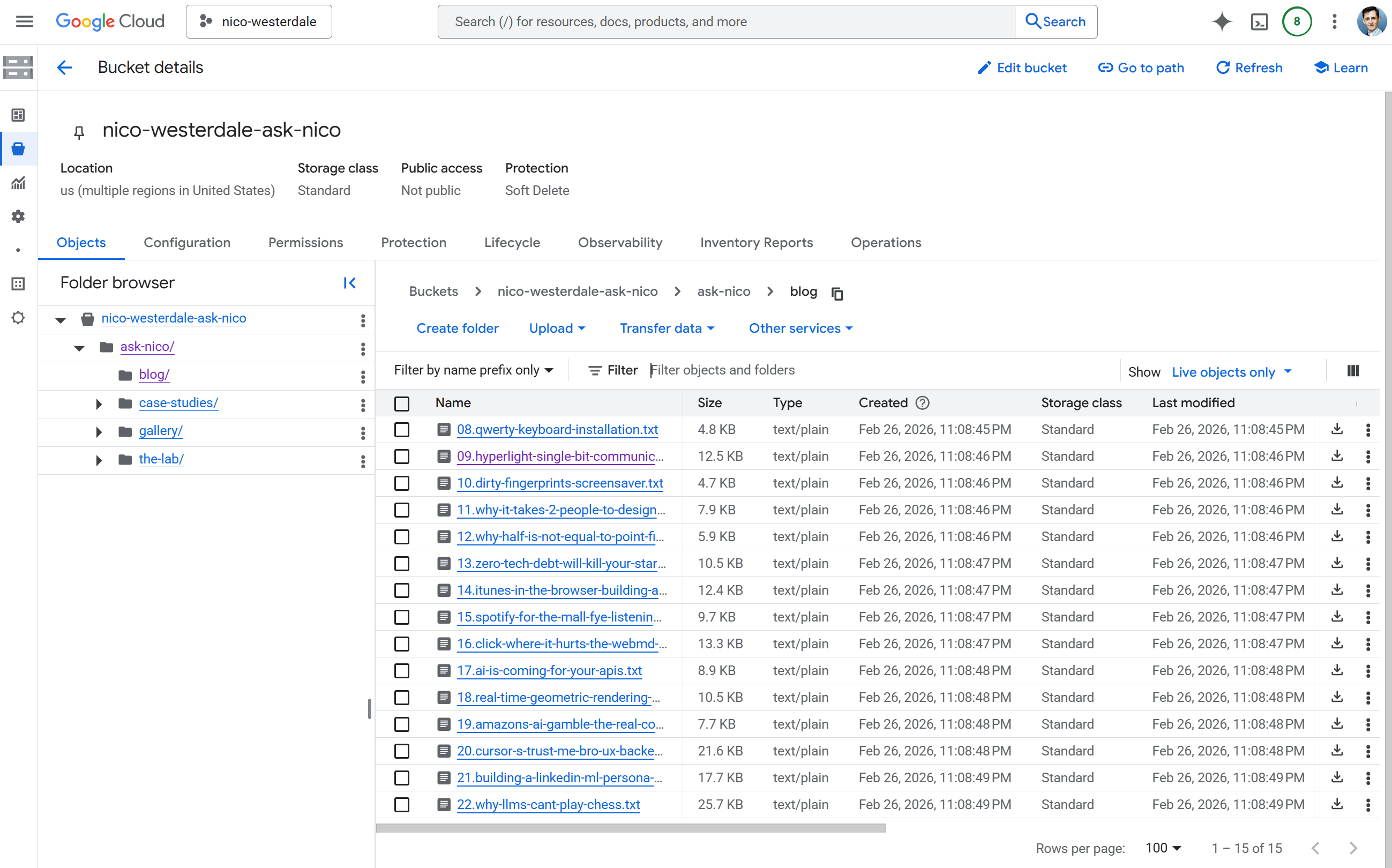
The first step is simple: create a Cloud Storage bucket in the us-central1 region that supports Vertex AI. This is where the transformed content will be staged. Private storage; we don't want it on the web.
A Node.js script populates the bucket. It reads .md and .yml files from content/, strips markdown to plain text, preserves YAML metadata as "Key: Value" blocks, injects a SOURCE_URL line so the RAG system can cite the original page, and uploads .txt files to gs://your-bucket/ask-nico/ preserving the folder structure. Create scripts/ask-nico-ingest/index.mjs:
// scripts/ask-nico-ingest/index.mjs
// Requires: pnpm add @google-cloud/storage
// Run: GCP_PROJECT=123 ASK_NICO_GCS_BUCKET=my-bucket node scripts/ask-nico-ingest/index.mjs

import { readFileSync, readdirSync } from 'fs'
import { join, relative } from 'path'
import { fileURLToPath } from 'url'
import { Storage } from '@google-cloud/storage'

const __dirname = fileURLToPath(new URL('.', import.meta.url))
const ROOT = join(__dirname, '../..')
const CONTENT_DIR = join(ROOT, 'content')

function toPlainText (text) {
  return text
    .replace(/\*\*([^*]+)\*\*/g, '$1')
    .replace(/\*([^*]+)\*/g, '$1')
    .replace(/^#+\s+/gm, '')
    .replace(/\[([^\]]+)\]\([^)]+\)/g, '$1')
    .replace(/`([^`]+)`/g, '$1')
    .trim()
}

function processMarkdown (text, relPath) {
  const sourcePath = relPath.replace(/\.(md|yml)$/, '').replace(/\\/g, '/')
  const sourceUrl = `SOURCE_URL: /${sourcePath}`
  const match = text.match(/^---\n([\s\S]*?)\n---\n?([\s\S]*)$/)
  if (!match) return `${sourceUrl}\n\n${toPlainText(text)}`.trim()
  const meta = match[1].split('\n').map(l => l.trim()).filter(l => l && !l.startsWith('#')).join('\n')
  return `${sourceUrl}\n${meta}\n\n${toPlainText(match[2])}`.trim()
}

function getFiles (dir, base = dir) {
  const files = []
  for (const ent of readdirSync(dir, { withFileTypes: true })) {
    const full = join(dir, ent.name)
    const rel = relative(base, full)
    if (ent.isDirectory() && !ent.name.startsWith('.') && ent.name !== 'node_modules') {
      files.push(...getFiles(full, base))
    } else if (ent.isFile() && (ent.name.endsWith('.md') || ent.name.endsWith('.yml'))) {
      files.push({ path: full, rel })
    }
  }
  return files
}

async function main () {
  const bucketName = process.env.ASK_NICO_GCS_BUCKET
  const projectId = process.env.GCP_PROJECT
  if (!bucketName || !projectId) {
    console.error('Set GCP_PROJECT and ASK_NICO_GCS_BUCKET')
    process.exit(1)
  }
  const bucket = new Storage({ projectId }).bucket(bucketName)
  const files = getFiles(CONTENT_DIR)
  for (const { path: fp, rel } of files) {
    const plain = processMarkdown(readFileSync(fp, 'utf-8'), rel)
    if (!plain) continue
    const gcsName = `ask-nico/${rel.replace(/\.(md|yml)$/, '.txt').replace(/\\/g, '/')}`
    await bucket.file(gcsName).save(plain, { contentType: 'text/plain' })
    console.log('Uploaded', gcsName)
  }
  console.log('Done')
}

main().catch(e => { console.error(e); process.exit(1) })
Install the dependency (pnpm add @google-cloud/storage), authenticate (gcloud auth application-default login), then run it with your project number and bucket name. The CI/CD section shows how to wire this into a GitHub Action so the bucket stays in sync on every push to main.
2. Create the Vertex AI Search App
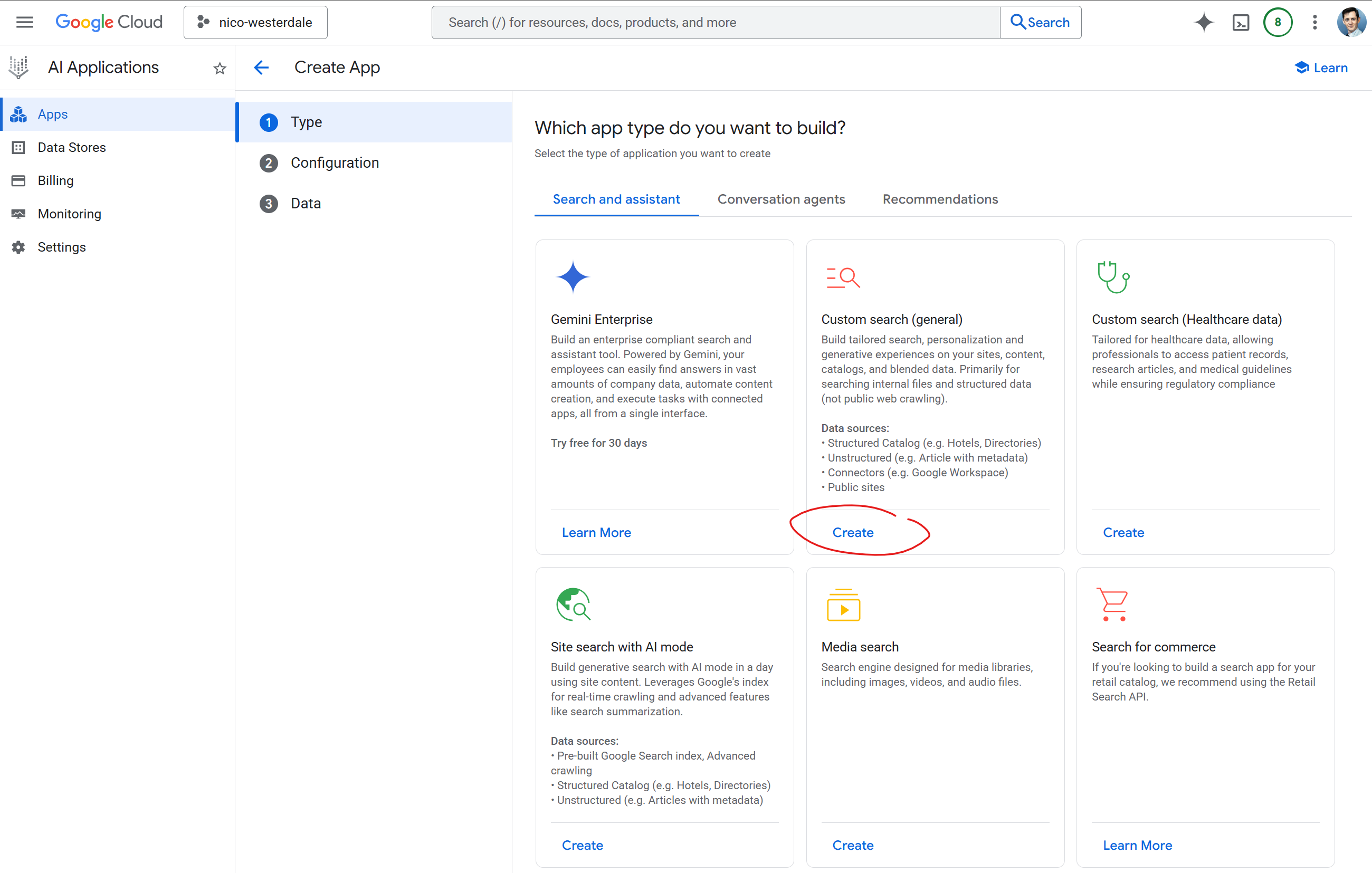
GCP is constantly updating its AI infrastructure and UX, so a lot of the guides out there are out of date. Even the names keep changing; Gemini used to be called Bard, Vertex used to be called AI Platform, and the gen-app-builder console has been reorganized more than once. The hardest part was often finding where to go, but once there the concepts are straightforward. I went to AI Applications > Apps in the GCP console and created a new application of this type: "Custom search (general)".
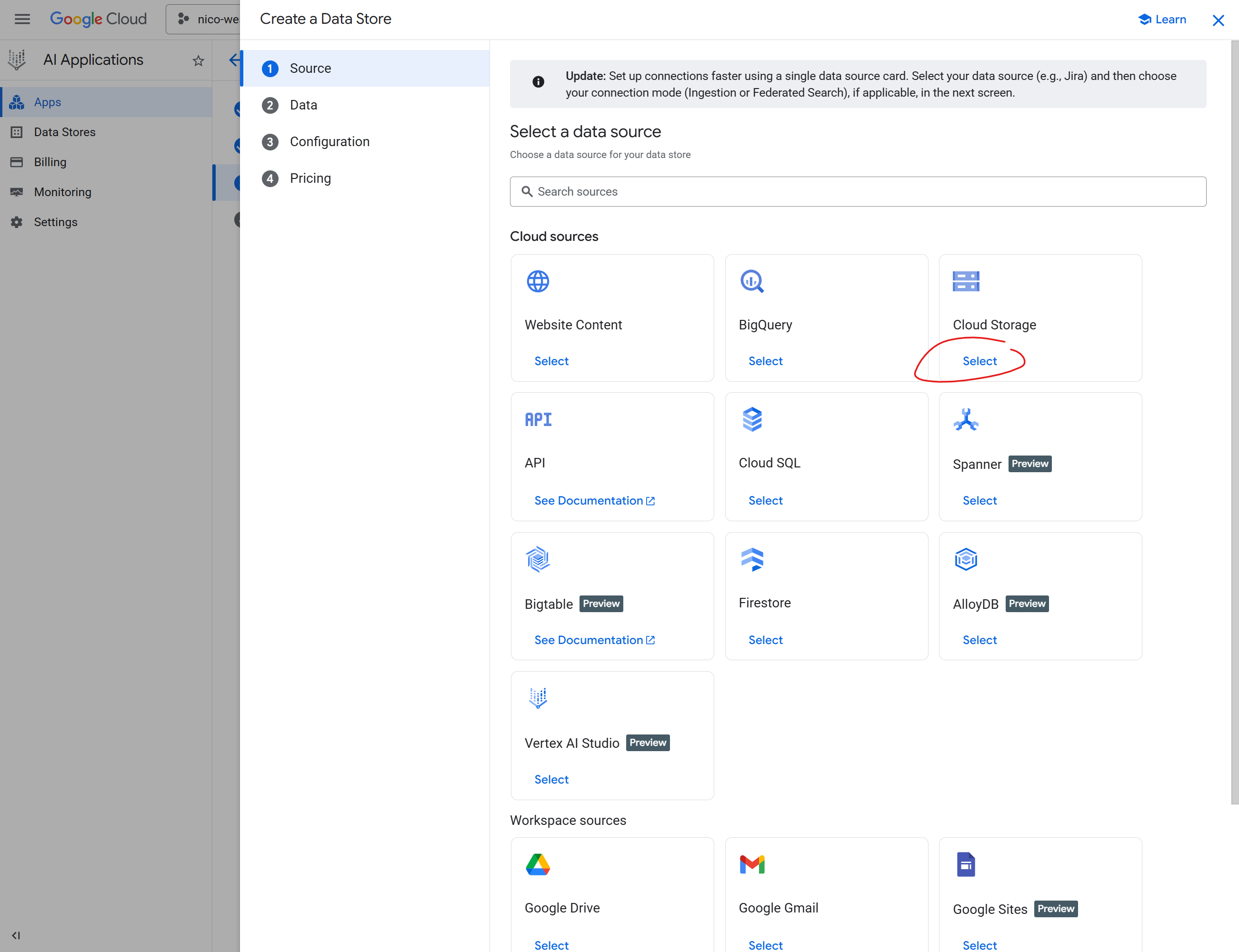
In the data source configuration I selected Cloud Storage and pointed it at my bucket with the path gs://your-bucket-name/ask-nico/**. The recursive wildcard ensures all subfolders (blog/, gallery/, etc.) are indexed. For synchronization frequency I chose One time; the CI/CD pipeline triggers re-imports via the Discovery Engine API whenever content changes on main, so I didn't need periodic or streaming sync.
Clicking through, I selected "Unstructured" data since the content is freeform text. Under the import options I chose Documents (unstructured files like TXT, HTML, PDF). I skipped "Documents with Metadata (RAG)" since that expects JSONL linking metadata to documents; my ingestion script produces plain .txt files. I could have structured the files and mapped the metadata more exactly, but from what I found it wasn't needed.
I enabled the APIs I needed: Discovery Engine for indexing and search, and Vertex AI for the Gemini model that powers the Answer API. Once the app is created, it generates both a data store ID and an engine ID. Here is how they interact: the data store holds the indexed content and is what the CI/CD import API writes to. The engine wraps the data store and exposes the Answer API (retrieval plus grounded generation in one call). For chat you want the engine ID; for triggering re-imports you need the data store ID. You may need both. The data store ID is shown in the app's data store section; the engine ID lives in the app details (look for "Engine" or "Engine ID"). If you hit NOT_FOUND errors with the data store path, switch to the engine ID. One gotcha: Discovery Engine expects your project number (e.g. 123456789012), not the project ID. You'll need that for the API path. For Gemini, the location must be regional (e.g. us-central1); it doesn't support global.
Add these to .env for local dev and deployment:
GCP_PROJECT=your-project-id              # project ID (string); required for fallback Gemini path
ASK_NICO_PROJECT_NUMBER=123456789012     # project number (numeric); Discovery Engine and CI ingest use this
ASK_NICO_DATA_STORE=your-datastore-id    # for import; use ASK_NICO_ENGINE_ID for chat if DataStore returns NOT_FOUND
ASK_NICO_ENGINE_ID=your-engine-id        # preferred for Answer API
ASK_NICO_GEMINI_LOCATION=us-central1
# Optional: ASK_NICO_GEMINI_MODEL=gemini-3.1-flash-lite-preview (default)
The ingest script expects GCP_PROJECT (project ID or number; both work for Storage). For local runs set it; in CI the workflow maps ASK_NICO_PROJECT_NUMBER to GCP_PROJECT when invoking the script.
For local dev, run gcloud auth application-default login so the server can authenticate to GCP. For production, the server uses Application Default Credentials: either set GOOGLE_APPLICATION_CREDENTIALS to the path of a service account JSON key, or run on GCP (e.g. Cloud Run, Firebase) where the default service account is used automatically. Ensure the service account has Discovery Engine and Vertex AI access. Set the same env vars on your host (Firebase, Vercel, etc.) as in .env.
Looking at all the "Preview" labels in the UX, you can see Google is scrambling to plumb their entire ecosystem together and enable seamless integration of their existing cloud assets with the Vertex stack. There's some interesting streaming ideas that are in Preview, and more data sources coming online. If you're reading this later in the year, the UX will likely be markedly different. There are also whole other sides of the Vertex stack we're not touching on here; this barely scratches the surface.
3. Run initial ingest
Before the data store can index anything, the bucket needs content. Run the ingestion script locally once:
$env:GCP_PROJECT = "your-project-number"
$env:ASK_NICO_GCS_BUCKET = "your-bucket-name"
gcloud auth application-default login
node scripts/ask-nico-ingest/index.mjs
Then trigger an import from the data source settings in the Vertex AI Search console (or wait if auto-sync runs). After the first run, CI/CD keeps the bucket updated.
4. Seed the Data Store
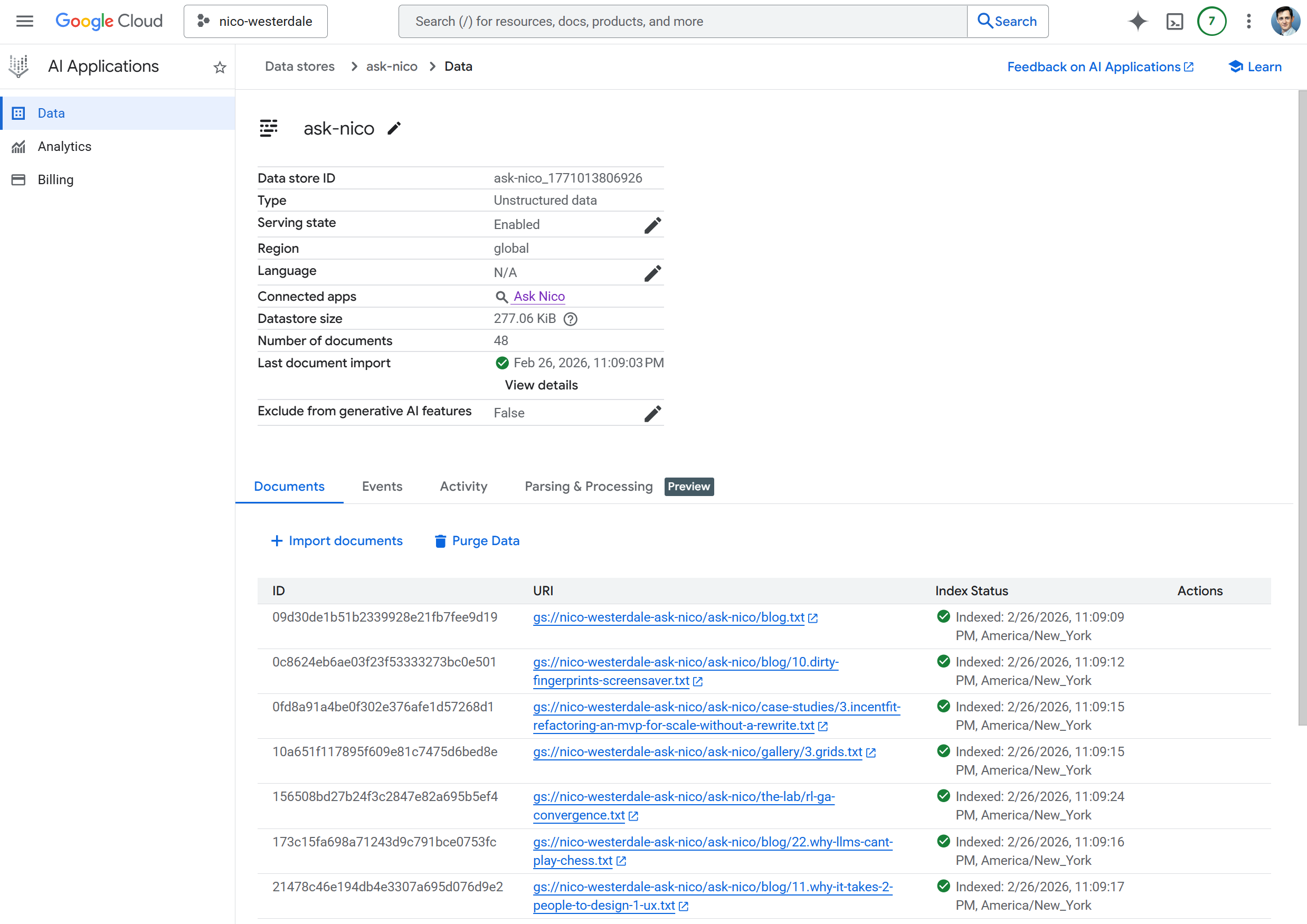
Once the bucket was configured and the data source pointed at it, Vertex AI Search started the initial import automatically. With the files in storage from the ingest step, I didn't need to trigger anything manually. Search returns 0 results until indexing completes; for larger datasets this can take 15–30 minutes.
Testing in the GCP UI
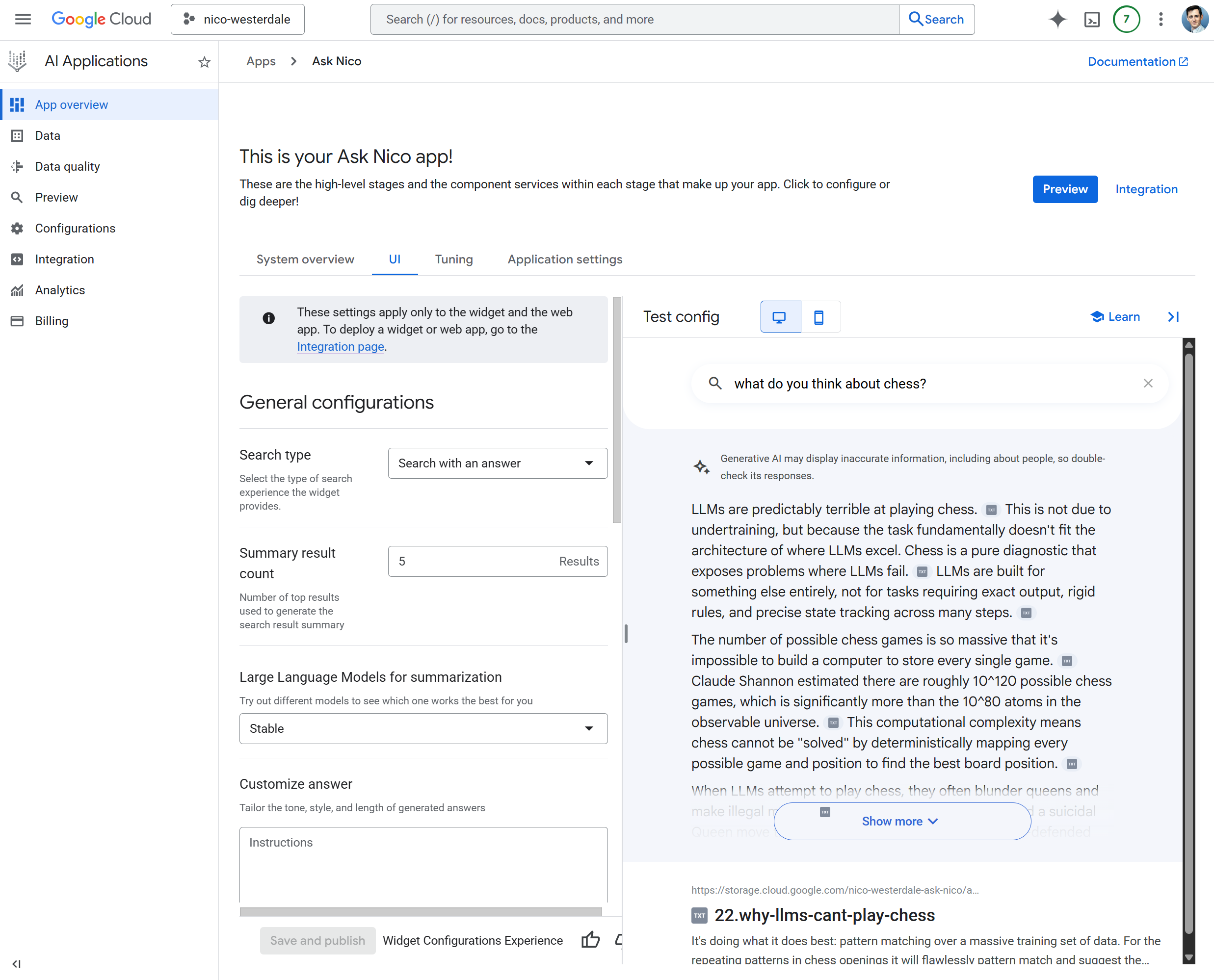
Before wiring up any custom UX, I verified the setup in the GCP console. I opened my Vertex AI Search app and used the built-in chat interface. I asked a question that I knew existed in my content. When I got grounded responses with citations, I knew the data store was working. So far this has all been point-and-click devops, and very straightforward to do. Google even produces some pre-built UI widgets that should seamlessly integrate with any website, and links to them right from the AI App page.
Custom UX in the Lab
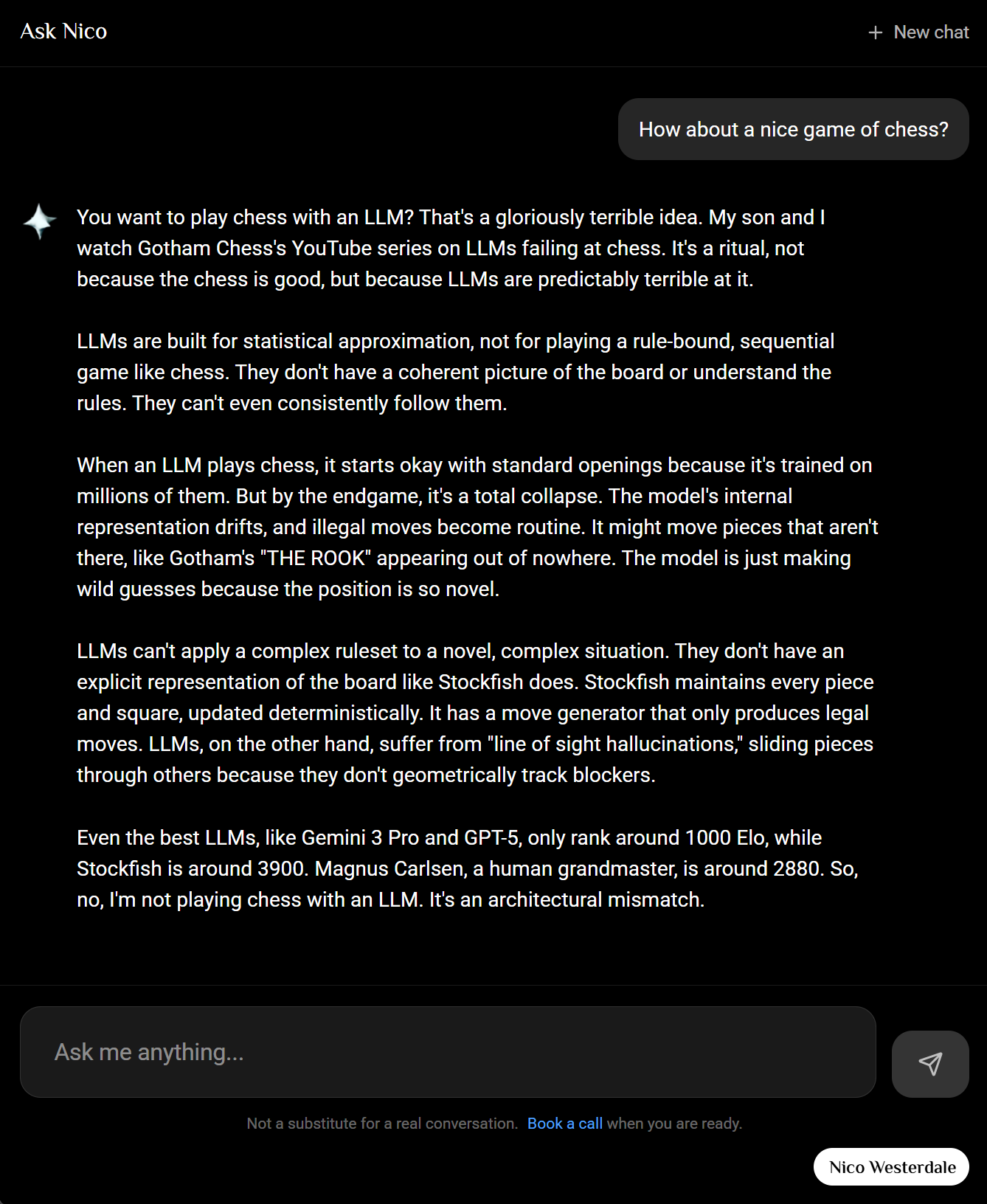
Instead of opting for the prebuilt widgets I wanted a more integrated seamless UX. With the backend working, the next step was a custom interface. Install the GCP client libraries:
pnpm add @google-cloud/discoveryengine @google-cloud/vertexai
I built a Vue component at app/components/lab/ask-nico/Index.vue that provides a chat UI with suggested prompts, session management, and a "reveal-down" animation for assistant responses. The Nuxt server route at server/api/lab/ask-nico/chat.post.ts calls the Vertex AI Answer API, passing the user's query and returning the grounded response.
The client just posts messages to the API:
// app/components/lab/ask-nico/Index.vue
const response = await $fetch('/api/lab/ask-nico/chat', {
  method: 'POST',
  body: {
    messages: messages.value.map(m => ({ role: m.role, content: m.content })),
    ...(sessionId.value ? { sessionId: sessionId.value } : {})
  }
})
The server route calls the Discovery Engine Answer API. Wire your env vars into Nuxt's runtime config so the server can read them. Add to nuxt.config.ts:
// nuxt.config.ts
export default defineNuxtConfig({
  runtimeConfig: {
    askNico: {
      searchProject: process.env.ASK_NICO_PROJECT_NUMBER || process.env.GCP_PROJECT || '',
      searchLocation: process.env.ASK_NICO_SEARCH_LOCATION || 'global',
      searchDataStore: process.env.ASK_NICO_DATA_STORE || '',
      searchEngineId: process.env.ASK_NICO_ENGINE_ID || '',
      geminiLocation: process.env.ASK_NICO_GEMINI_LOCATION || 'us-central1'
    }
  }
})
In the server route, build the servingConfig path from your env vars. Use the engine if set, otherwise the data store. For multi-turn conversations, create a session when none is provided and return sessionId so the client can send it on follow-up messages:
// server/api/lab/ask-nico/chat.post.ts (simplified)
// body = await readBody(event) with messages and optional sessionId
const config = useRuntimeConfig().askNico
const project = config.searchProject || process.env.ASK_NICO_PROJECT_NUMBER
const location = config.searchLocation || 'global'
const servingConfig = config.searchEngineId
  ? `projects/${project}/locations/${location}/collections/default_collection/engines/${config.searchEngineId}/servingConfigs/default_search`
  : `projects/${project}/locations/${location}/collections/default_collection/dataStores/${config.searchDataStore}/servingConfigs/default_search`

let sessionToUse = body.sessionId?.trim() || null
if (!sessionToUse && config.searchEngineId) {
  const sessionsParent = `projects/${project}/locations/${location}/collections/default_collection/engines/${config.searchEngineId}`
  const createRes = await fetch(`https://discoveryengine.googleapis.com/v1/${sessionsParent}/sessions`, {
    method: 'POST',
    headers: { 'Authorization': `Bearer ${accessToken}`, 'Content-Type': 'application/json' },
    body: JSON.stringify({ userPseudoId: `ask-nico-${crypto.randomUUID()}` })
  })
  if (createRes.ok) {
    const created = await createRes.json()
    sessionToUse = created.name ?? null
  }
}

const answerUrl = `https://discoveryengine.googleapis.com/v1/${servingConfig}:answer`
const res = await fetch(answerUrl, {
  method: 'POST',
  headers: {
    'Authorization': `Bearer ${accessToken}`,
    'Content-Type': 'application/json'
  },
  body: JSON.stringify({
    query: { text: query },
    ...(sessionToUse ? { session: sessionToUse } : {}),
    answerGenerationSpec: {
      promptSpec: { preamble: ANSWER_PREAMBLE },
      includeCitations: true,
      answerLanguageCode: 'en'
    }
  })
})

// Return sessionId so the client can send it on the next turn
const data = await res.json()
return { reply: data.answer?.answerText ?? '', citations: {...}, sessionId: data.session?.name ?? sessionToUse }
Here's a simplified version of the Vue component that wires it up. Replace /api/lab/ask-nico/chat with your own API path if different:
<script setup lang="ts">
const messages = ref<Array<{ role: 'user' | 'assistant', content: string }>>([])
const input = ref('')
const isLoading = ref(false)

const sendMessage = async () => {
  const text = input.value.trim()
  if (!text || isLoading.value) return

  messages.value.push({ role: 'user', content: text })
  input.value = ''
  isLoading.value = true

  const assistantMsg = { role: 'assistant' as const, content: '' }
  messages.value.push(assistantMsg)

  try {
    const res = await $fetch<{ reply: string }>('/api/lab/ask-nico/chat', {
      method: 'POST',
      body: { messages: messages.value.filter(m => m.content).map(m => ({ role: m.role, content: m.content })) }
    })
    assistantMsg.content = res.reply ?? 'No response.'
  } catch {
    assistantMsg.content = 'Something went wrong.'
  } finally {
    isLoading.value = false
  }
}
</script>

<template>
  <div class="flex flex-col p-4 gap-4">
    <div class="space-y-2 overflow-y-auto">
      <div v-for="(msg, i) in messages" :key="i" :class="msg.role === 'user' ? 'text-right' : ''">
        <div v-if="msg.role === 'user'" class="inline-block px-3 py-2 rounded bg-blue-600 text-white whitespace-pre-wrap">
          {{ msg.content }}
        </div>
        <div v-else class="whitespace-pre-wrap">{{ msg.content }}</div>
      </div>
      <div v-if="isLoading" class="text-gray-500">Thinking...</div>
    </div>
    <form @submit.prevent="sendMessage" class="flex gap-2">
      <textarea v-model="input" placeholder="Ask anything..." class="flex-1 p-2 border rounded" rows="2" />
      <button type="submit" :disabled="!input.trim() || isLoading" class="px-3 py-2 rounded bg-blue-600 text-white disabled:opacity-50">
        Send
      </button>
    </form>
  </div>
</template>
Run pnpm dev and visit your chat page to test.
The full implementation adds suggested prompts, session persistence, and a reveal-down animation.
Citation Linking
Vertex AI Search returns file paths like blog/21.building-a-linkedin-ml-persona.... My site uses clean slugs without the number prefix. Three things matter to avoid broken links or raw Markdown in the UI.
1. Normalize each citation URL before returning
Apply normalization on the server when building the citations map, not after. For every citation you add to the map, run the raw URI through toRelativePath and stripNumberPrefixFromPath so the client receives clean URLs:
/** Strip leading "N." from path segments (e.g. /blog/21.building-a-linkedin... -> /blog/building-a-linkedin...). */
function stripNumberPrefixFromPath(path: string): string {
  const leadingSlash = path.startsWith('/')
  const segments = path.split('/').map(segment => segment.replace(/^\d+\./, ''))
  const joined = segments.filter(Boolean).join('/')
  return leadingSlash ? `/${joined}` : joined
}

/** Normalize to relative path for use in Markdown links. */
function toRelativePath(url: string): string {
  try {
    const u = new URL(url, 'https://placeholder')
    if (u.pathname && u.pathname !== '/') return u.pathname
    return url
  } catch {
    return url.startsWith('/') ? url : `/${url}`
  }
}

// When building citations from Vertex API response, normalize each one before adding to the map:
const rawLink = ref.uri ?? ref.documentMetadata?.uri ?? ''  // e.g. "https://.../blog/21.building-a-linkedin..."
const cleanUrl = stripNumberPrefixFromPath(toRelativePath(rawLink))  // -> "/blog/building-a-linkedin..."
const entry = { url: cleanUrl, title: title || undefined }  // use cleanUrl, not rawLink
Inside your extractCitations (or equivalent) loop, use cleanUrl for each entry. Do not pass the raw Vertex URI to the client.
2. Handle both Markdown links and citation markers
The Answer API returns citation markers like [1] or [a] in the reply text. The LLM may also emit inline Markdown links [text](url) when it references a post. The reply renderer must handle both. If it only handles citation markers, you will see raw [text](url) in the UI. Process Markdown links first, then citation markers, and escape all content before building links.
3. Citation URL format
Citation URLs can be relative paths (e.g. /blog/some-post) or absolute URLs (https://...). The server should normalize Vertex's raw URLs to whatever format your composable expects. If the composable only accepts absolute URLs for citations, the server must send absolute. If it accepts relative paths, send relative. The server and composable must agree or citation links will not render. For same-site links, relative paths work regardless of domain. The cleanContentPath helper strips number prefixes from paths used in Markdown links.
// app/composables/useAskNicoReplyHtml.ts
// Requires: cleanContentPath from useContentSlug for relative paths in Markdown links
import { cleanContentPath } from './useContentSlug'
function renderReplyMarkdownLinks(raw: string, citations?: Record<string, { url: string, title?: string }>): string {
if (!raw) return ''
const escape = (s: string) =>
s.replace(/&/g, '&').replace(/</g, '<').replace(/>/g, '>').replace(/"/g, '"').replace(/'/g, ''')
const isSafeHref = (href: string): boolean => {
const t = href.trim()
if (/^\s*javascript:/i.test(t)) return false
return (t.startsWith('/') && !t.startsWith('//')) || /^https?:\/\//i.test(t)
}
// 1. Markdown links [text](url) first
const linkRe = /\[([^\]]*)\]\(([^)]*)\)/g
let lastIndex = 0
const parts: string[] = []
let m: RegExpExecArray | null
while ((m = linkRe.exec(raw)) !== null) {
parts.push(escape(raw.slice(lastIndex, m.index)))
const label = m[1] ?? ''
let url = (m[2] ?? '').trim()
if (isSafeHref(url)) {
if (url.startsWith('/')) url = cleanContentPath(url)
parts.push(`<a href="${escape(url)}" target="_blank" rel="noopener noreferrer">${escape(label)}</a>`)
} else {
parts.push(escape(m[0]))
}
lastIndex = m.index + m[0].length
}
parts.push(escape(raw.slice(lastIndex)))
let html = parts.join('')
// 2. Citation markers [1], [a], [i, j]
const citationRe = /\[([a-zA-Z0-9]+(?:\s*,\s*[a-zA-Z0-9]+)*)\]/g
html = html.replace(citationRe, (match, refs: string) => {
const first = refs.split(',')[0]?.trim()?.toLowerCase()
if (!first || !citations) return ''
const cit = citations[first]
if (!cit || !cit.url || !/^https?:\/\//i.test(cit.url)) return ''
const titleAttr = cit.title ? ` title="${escape(cit.title)}"` : ''
return `<a href="${escape(cit.url)}" target="_blank" rel="noopener noreferrer"${titleAttr}>${escape(match)}</a>`
})
return html
}
In the template, use v-html with the result. Escape all user content first; the composable does that before building links.
<div v-html="renderReplyMarkdownLinks(msg.content, msg.citations)" />
CI/CD and Auto-Updating from GitHub
The index needed to stay in sync with the blog. I set up a GitHub Action that runs the ingestion script and triggers a re-import every time content changes on main.
Add these GitHub secrets (Settings → Secrets and variables → Actions):
| Secret | Description |
|---|---|
ASK_NICO_GCP_SA_KEY | JSON key of a service account with Storage Object Admin and Discovery Engine Admin roles |
ASK_NICO_PROJECT_NUMBER | Your GCP project number (not project ID) |
ASK_NICO_GCS_BUCKET | The GCS bucket name where the ingestion script uploads files |
ASK_NICO_DATA_STORE | The data store ID from your Vertex AI Search app |
The workflow runs on push to main when content/, the ingest script, or the workflow file itself changes:
# .github/workflows/ask-nico-ingest.yml
name: Ask Nico - Content Ingest
on:
  push:
    branches: [main]
    paths:
      - 'content/**'
      - 'scripts/ask-nico-ingest/**'
      - '.github/workflows/ask-nico-ingest.yml'

jobs:
  ingest:
    runs-on: ubuntu-latest
    steps:
      - uses: actions/checkout@v4
      - uses: pnpm/action-setup@v4
      - uses: actions/setup-node@v4
        with:
          node-version: '20'
          cache: 'pnpm'
      - run: pnpm install

      - name: Authenticate to GCP
        uses: google-github-actions/auth@v2
        with:
          credentials_json: ${{ secrets.ASK_NICO_GCP_SA_KEY }}

      - name: Ingest content to GCS bucket
        run: node scripts/ask-nico-ingest/index.mjs
        env:
          GCP_PROJECT: ${{ secrets.ASK_NICO_PROJECT_NUMBER }}
          ASK_NICO_GCS_BUCKET: ${{ secrets.ASK_NICO_GCS_BUCKET }}

      - name: Trigger Vertex AI Search Import
        run: |
          ACCESS_TOKEN=$(gcloud auth print-access-token)
          curl -X POST \
            -H "Authorization: Bearer $ACCESS_TOKEN" \
            -H "Content-Type: application/json" \
            "https://discoveryengine.googleapis.com/v1/projects/${{ secrets.ASK_NICO_PROJECT_NUMBER }}/locations/global/collections/default_collection/dataStores/${{ secrets.ASK_NICO_DATA_STORE }}/branches/0/documents:import" \
            -d '{
              "gcsSource": {
                "inputUris": ["gs://${{ secrets.ASK_NICO_GCS_BUCKET }}/ask-nico/**"],
                "dataSchema": "content"
              },
              "reconciliationMode": "INCREMENTAL"
            }'
The "Ingest content to GCS bucket" step runs scripts/ask-nico-ingest/index.mjs. That script transforms my markdown into something the LLM can use. My blog is a collection of .md files; to an LLM, that's just more "Data Sludge." I needed to clean it without losing metadata. If the AI doesn't know when I wrote something, it can't understand the temporal context of my technical shifts.
The script does three things:
- Strip the Noise: Removes markdown syntax (bolding, links, etc.) to keep the token count low and the focus on the text.
- Preserve the Markup: I don't just dump the text. I preserve the YAML markup as "Key: Value" blocks at the top of each file. The LLM needs the date and tags to know if my take on a technology is current or a relic of 2024.
- Inject the Source: Every file gets a
SOURCE_URLat the top so the RAG system knows exactly which page on my site an answer came from.
The result is a clean set of .txt files uploaded to the GCS bucket, organized by their original folder structure (blog/, the-lab/, etc.). The import API call tells Vertex AI Search to re-index from that path. reconciliationMode: INCREMENTAL means only changed files are processed; the rest of the index stays intact. No manual re-ingest required. If you get 403 on import, ensure the service account has Discovery Engine Admin; if you see 0 results, check the Activity tab in the Vertex AI Search console.
So What's Actually Happening in Vertex?
Under the covers, Vertex AI Search is doing the standard RAG pipeline. It parses each document, chunks it into smaller segments (so retrieval can return relevant passages, not whole files), and generates embeddings for each chunk. Embeddings are dense vector representations that capture semantic meaning; similar content maps to nearby points in a high-dimensional space. Those vectors get indexed in a vector database. When you ask a question, your query is embedded too, and the system runs a similarity search to find the chunks whose vectors are closest to the query vector. The top matches are then passed to Gemini as context for the answer. It's retrieval-augmented generation: retrieve first, then generate. No manual chunking or embedding code required; Vertex handles it.
So how is this different from passing the text of a document into an off-the-shelf LLM along with a query? LLMs have fixed context windows and no memory of your private content. You can't stuff a decade of blog posts into a single prompt; even if you could, the model would forget the middle. RAG is a catch-all term for "retrieve relevant bits, then generate," and implementations vary wildly. The key difference is that you're not asking the model to remember everything. You're asking it to answer from a curated slice of your documents or data, fetched at query time. The retrieval step does the heavy lifting; the LLM just synthesizes what it's given. That keeps responses grounded and avoids the hallucination drift that comes from relying on the model's training alone.
The alternative is to train or fine-tune a model on your content. That's more work: you need a curated dataset, compute, and a pipeline to produce a new model artifact. The change is permanent; the model weights are altered. Once trained, the model has internalized your data. RAG is the opposite. The model stays the same. You're not changing what it knows; you're changing what you give it at inference time. Update your documents, re-index, and the next query sees the new content. No retraining. For a blog that grows over time, that's the right trade-off.
Wrapping Up
If you have a static site or a pile of markdown, you can do this too. I opted for some additional orchestration and code to integrate the outputs, but the cool part is that the core RAG is very automated. You're really just interfacing with it like any AI. The plumbing is mostly GCP console clicks, a small ingest script, and a server route. Try Ask Nico if you want to see it in action, or point your favorite LLM at this post and ask it to build it with you. Either way, your content deserves a voice, and I'm sure mine is already complaining about its user on Moltbook.